
Indexing is the step most beginners skip without even knowing it exists. This second chapter of the course to learn SEO in 2026 tackles the first truly concrete building block, the one that decides whether your pages have any chance of existing in Google’s eyes. In ten years of doing SEO day in and day out, I have watched dozens of sites publish article after article while wondering why nothing ever showed up, when the problem was right there at the root, before any question of keywords or content. So we are going to take the time to understand this mechanism, because once it is clear in your head, you will never look at a brand new site the same way again.
TL;DR
Indexing is the moment Google files your page into its enormous database. Without that filing, your page cannot appear in any result, no matter how good its content is.
Being online and being indexed are two different things. A perfectly published page can stay completely ignored by Google for weeks.
A refusal almost always has an identifiable cause: a technical block, a noindex tag, content judged too thin, or simply a page too recent for Google to have processed yet.
Google Search Console tells you for free, page by page, where each of your URLs stands. That is the first reflex to build before panicking.
Summarize This Article with AI
ChatGPTContents
Where we left off in the previous chapter
Indexing: the moment Google decides to keep your page
Why a page that is clearly online can stay invisible
The most common reasons Google refuses a page
Where we left off in the previous chapter
In the first chapter, we saw how Google crawls, indexes and ranks pages in a loop, and why the right mindset beats every trick in the book. We laid out the three moves the engine repeats over and over: crawl, index, rank. This chapter stops on the second one, because it is the move nobody explains to beginners and yet the one that blocks the most sites at the start.
Just hold onto the order for now. Google first has to find your page, then decide to keep it, and only after that can it rank the page when someone runs a search. If the second step never happens, the third one never comes. You can have the best article in the world, but if it is not indexed, it does not exist for the engine. It sounds blunt put that way, and that is exactly why indexing deserves a chapter of its own.
Indexing: the moment Google decides to keep your page
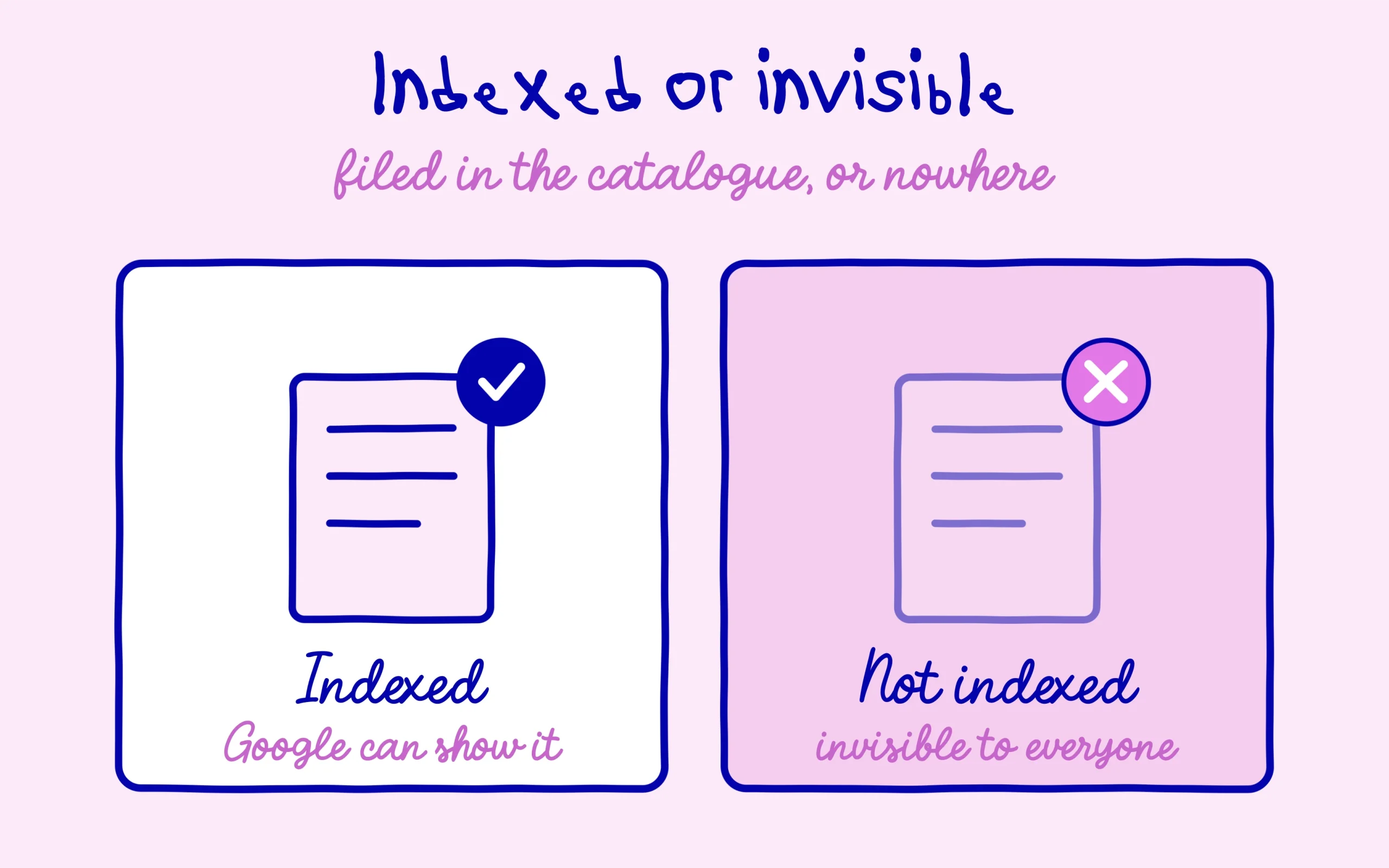
When Google discovers a page, it does not automatically drop it into the results. It reads the page, analyses it, and decides whether or not to file it in its index. Indexing is exactly that filing: Google creates a record of your page in a gigantic database, with what it contains, what it is about, and which searches it might answer. An indexed page is a page the engine knows and can bring back. A non-indexed page is invisible, even if you type its exact title into the search bar.
The image that works best with beginners is the library. Crawling is the librarian walking the shelves and coming across your book. Indexing is the moment the librarian decides to enter it into the catalogue, with its record and its shelf location. Ranking is when a reader asks for a topic and the librarian picks which books from the catalogue to recommend first. If your book was never entered into the catalogue, no reader will ever be offered it, whatever its quality. Your page follows that exact same path.
That sorting is neither automatic nor guaranteed. Google processes tens of billions of pages and it makes choices. Over the years, its big updates have steadily raised the bar for what it agrees to keep, and the story of those updates, from Panda to AI, is precisely the story of that tightening. Today, earning indexing is no longer a given for a new site, it is already a small first signal that your page is worth keeping.
Why a page that is clearly online can stay invisible
This is the point that throws people off the most at the start. You publish a page, it displays perfectly in your browser, you can send it by email, it is genuinely online. And yet Google shows it nowhere. The confusion comes from here: putting a page online and getting it indexed are two completely separate operations. The first depends on you and your host. The second depends entirely on Google, on its visit to your page, and on its decision to keep it.
First, there is a question of time. A brand new site is barely known to Google, which visits it rarely and in no hurry. It is not unusual for a new page to take several days, sometimes several weeks, before it is processed. That delay is neither a bug nor a punishment, it is normal behaviour for a site that has not yet built its reputation. Patience is part of the job, especially in the first months, and stressing over zero traffic in week one helps absolutely nothing.
But sometimes the delay explains nothing, and the page stays out of the index weeks after publication. At that point it is no longer about waiting, it is that a signal is telling Google not to keep the page, or is flatly stopping it from reaching it. That is what we are going to look at now, because in the vast majority of cases the cause is simple, spotted in a few minutes, and fixed without any particular technical skill.
The most common reasons Google refuses a page
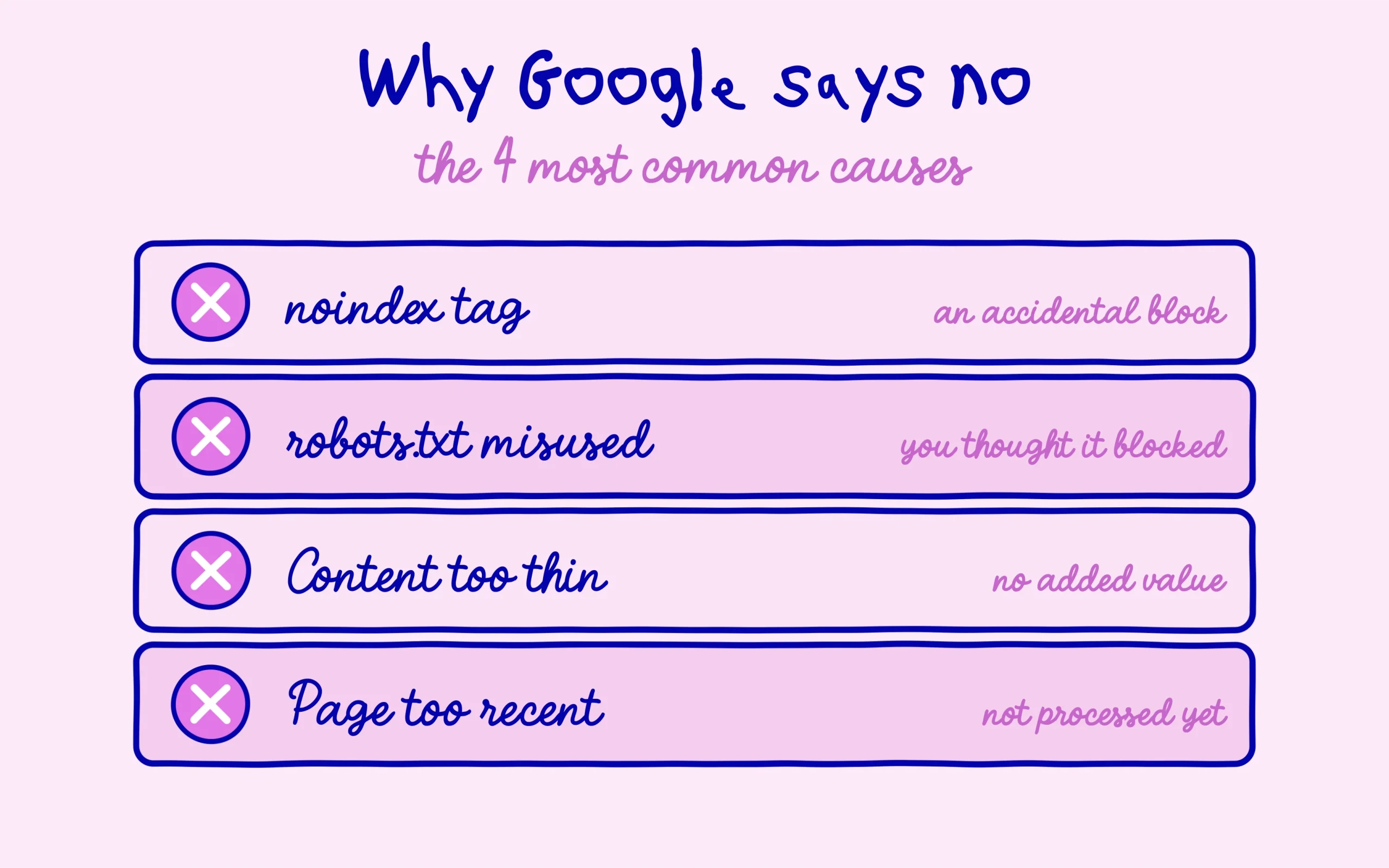
The first cause, the most frequent among beginners, is an accidental technical block. A noindex tag left by mistake on a page or on a whole template of pages, a box ticked without realising it in an SEO plugin, a page left as a draft and forgotten. Google reads the instruction “do not keep this page” and it dutifully obeys. It is frustrating because the content is good, but the good news is that it takes one click to fix once you have put your finger on it.
The second cause, often confused with the first, is thinking you blocked a page when you only half hid it. Many people believe that adding a line to the robots.txt file is enough to make a page vanish from Google, when in fact blocking in robots.txt is not the same as noindex, and the effect can even be the opposite of what you hoped. The two mechanisms do different jobs: one stops Google from reading the page, the other asks it not to keep the page. Confusing them creates situations where the engine shows a page you wanted hidden, or ignores an instruction you thought you had given.
The third cause is the hardest to hear: Google saw the page and decided it did not deserve its spot. Content too short, a near-empty page, text that already exists in ten copies elsewhere, or posts churned out with no real added value. The engine has become very demanding on this, and what it actually penalises about generated content is less about the tool used than about publishing something that adds nothing beyond what already exists. A page can be technically flawless and still stay out of the index simply because it is judged useless.
The fourth cause, finally, is the mildest: the page is simply too recent and Google has not processed it yet. Nothing to fix here, just check that the rest is clean and let time do its work. The real trap is confusing this last cause with the other three and staying passive while a genuine block drags on. Hence the next step, which is the only reliable way to know which case you are actually in instead of guessing.
How to check whether your pages are being counted
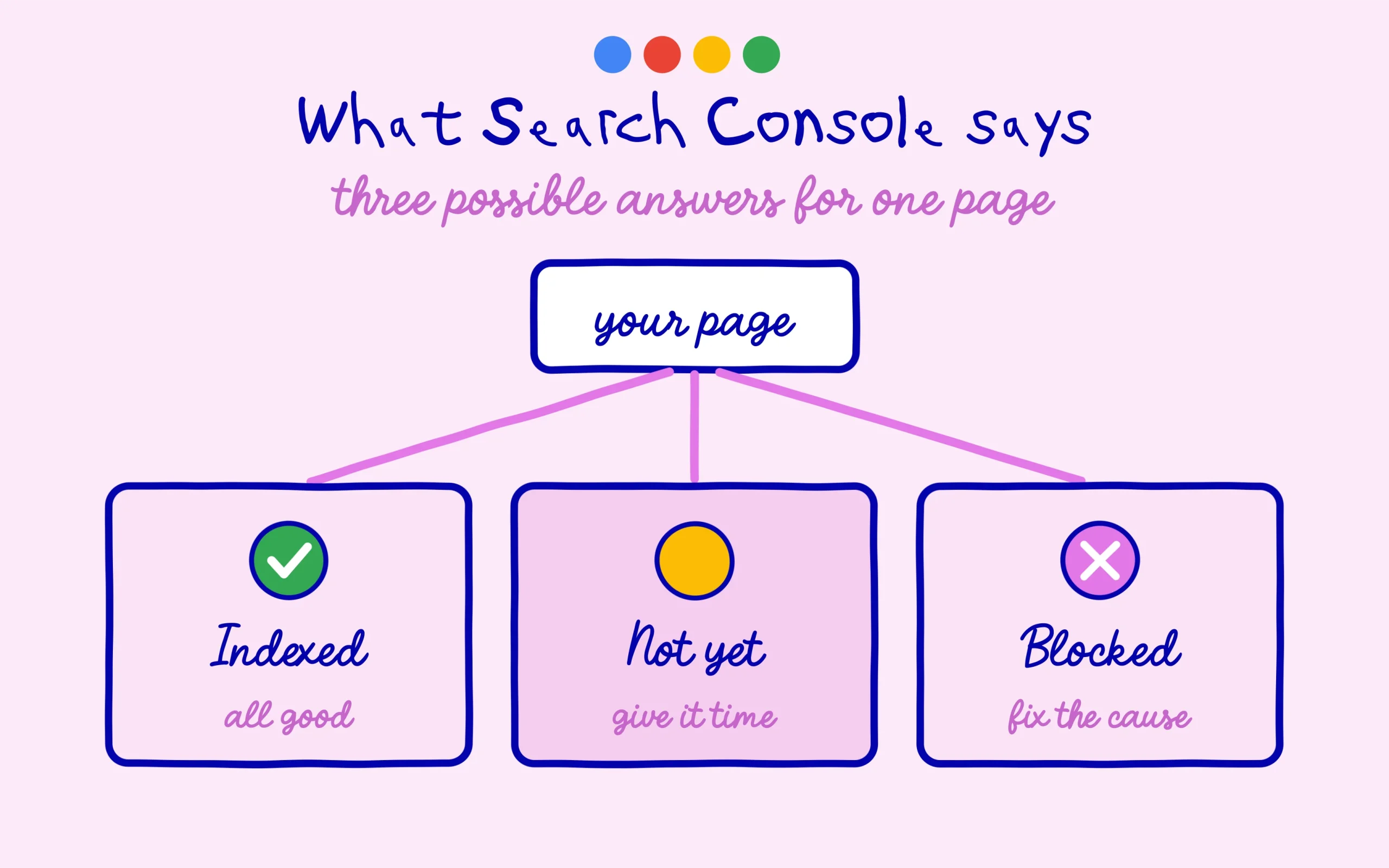
The only tool that gives you the exact answer, for free, is Google Search Console. We will devote a whole chapter to it later in the course, because it deserves to be truly mastered. For indexing, what matters at this stage sits in a single feature: URL inspection. You paste a page address, and Google tells you plainly whether it is indexed, not yet indexed, or actively blocked by something.
When a page is not indexed, Search Console almost always shows a reason, and that is where you have to learn to read without overreacting. Some messages are plain waiting states, others signal a real block. Google itself has acknowledged that most of the errors surfaced in Search Console matter less than people think, which should reassure you: seeing an unusual status does not mean your site is broken. The whole point is to tell the “not processed yet, come back later” message apart from the “I am refusing this page, and here is why” message.
If the page is blocked by a tag or an instruction, you fix the cause, then you can ask Google to re-examine it directly from the tool. If it is only a matter of freshness, you make sure the page is properly linked from the rest of your site, because a page no link points to is a page Google struggles to find, and you let the engine come back at its own pace. In both cases, you have moved from “I do not understand why nothing works” to a clear diagnosis. That is the whole difference between suffering SEO and starting to steer it.
Where we go in the next chapter
You now know what indexing is, why a page that is online can stay invisible, the four main reasons behind a refusal, and how to reach a clear diagnosis with Search Console. This is the foundation of everything else: as long as a page is not indexed, no optimisation is worth anything at all. Keep this reflex for the entire life of your site, before you wonder why a page will not climb, first check that it is actually in the index.
The next chapter crosses to the other side of the screen, the visitor’s side. We are going to break down a Google results page: the classic links, the “people also ask” questions, the featured snippets that grab the top position without even being the first link. Understanding what a results page really looks like in 2026 means understanding where your page can slip in and by which route. See you in the next chapter. Keep learning on SEO Noobies.



[…] Cleanup falls to the last family. Spam detection systems and removal-based demotions push aside manipulative practices and problematic content. Worth noting: none of these systems ever meet your page until it exists in the index. A page blocked upstream never reaches any of this machinery, which is exactly why the course took the detour through what indexing really means and why Google sometimes refuses your pages. […]
[…] just launched can look invisible for weeks without a single error on its end. The course chapter on what indexing really means, and why Google sometimes refuses your pages walks through the most common causes of a delay, on top of this simple stacking […]