
AI Mode queries have started landing in Search Console performance reports over the past few days, and they look genuinely strange: rows reading “yes”, “yes, go on” or “which one do you recommend”. Those fragments are not a display bug and they are not bot spam. They are real follow-up questions typed by people mid-conversation with the search engine, and Google logs each one as a search in its own right. For anyone still learning to read Search Console properly, that discovery changes how the numbers in the report should be interpreted. Here is what is actually going on and how to handle those rows without drawing the wrong conclusion.
TL;DR
AI Mode queries have been showing up in Search Console performance reports since early August, as very short conversational fragments.
Google confirms AI Mode and AI Overviews data sits inside the general performance report, with no label separating it from ordinary search.
Every follow-up question inside a conversation counts as a fresh search, carrying its own impressions, clicks and position.
Average position can move without anything changing in your SEO, so check what the queries actually are before reacting to the curve.
Summarize This Article with AI
ChatGPTQueries that read like half a conversation
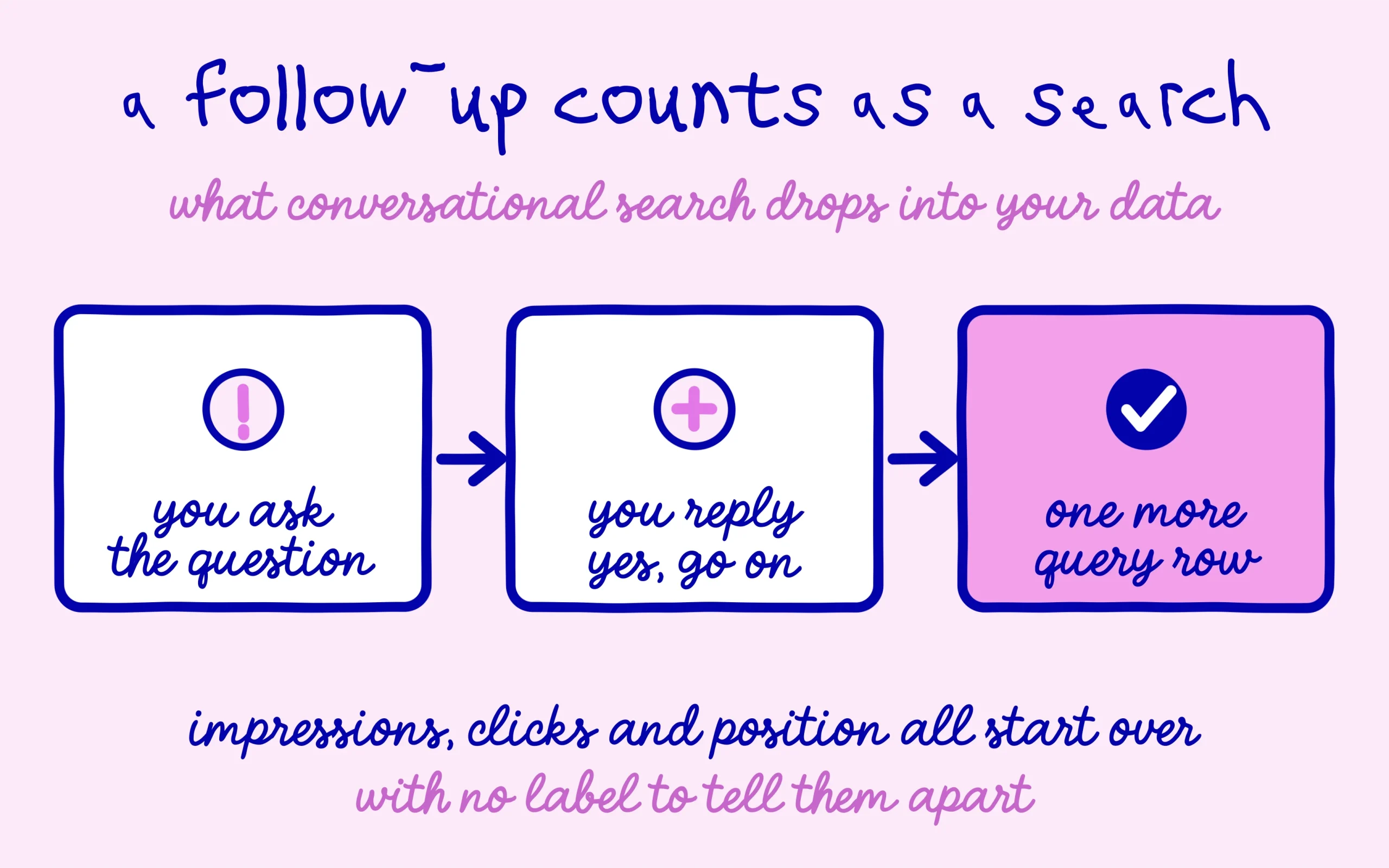
The first reports came from an ordinary performance view on a standard Search Console property. Sitting among the expected queries were rows reading “yes”, “yes, pricing” and “yes, go on”, each carrying impressions and in some cases clicks.
Other practitioners confirmed seeing the same pattern on their own properties within days. So this is not one odd property misbehaving, and it reaches small sites as readily as large ones, provided the pages get picked up inside a generated answer.
The cause makes sense once you know how the conversational surface works. Someone asks the engine a question, gets a written answer with source links attached, then keeps going with “yes, carry on” or “which would you recommend”. That reply triggers a new answer, which means new links, which means new sources on display.
Google treats that reply as a full search. Whatever the person typed becomes a query and lands verbatim in your performance report. A line of dialogue turns into a row of search data, and everything downstream inherits that quirk.
Why AI Mode queries muddle your average position
Position is where this hurts most. Each follow-up generates a brand new answer, so the links inside it start again at one, two, three and onward. A site cited in a follow-up answer therefore records an excellent position on a query that means nothing when read alone.
Mix a few dozen of those rows into your usual queries and the overall average starts drifting for reasons that have nothing to do with your content. Someone watching only the line chart could read that as a ranking win or a ranking collapse, when the sample composition is what moved. False signals like that are a familiar hazard, much like the Search Console errors Google keeps telling people to ignore.
The second problem is that nothing marks these rows out. No filter, no tag, no column tells you that you are looking at AI Mode queries rather than typed searches. Spotting the phrasing by eye is currently the only method available, which is as rough as it sounds.
Google did ship dedicated reporting for generative surfaces back in June, set out in its announcement of the Search generative AI performance reports. Those reports cover impressions, clicks, pages and countries while stopping short of query detail. The data that would let you sort this out cleanly therefore lives in the general report, buried among everything else, while the specialised report stays silent on exactly that point.
None of this is new in spirit. The engine has already shown it arranges these surfaces to suit itself, as it did when AI Mode started citing Google’s own listings ahead of third-party sources. You inherit the numbers without the context behind them, and that holds across most of the generative surfaces.
What to do with these rows as a beginner
Start by leaving your content alone. Optimising a page for the AI Mode queries you find there makes no sense, because the phrase describes a conversational turn rather than a need. Those rows are not keywords waiting to be worked.
Build a filtering habit instead. Inside the performance report, filtering queries that contain your core topic, or excluding very short strings, restores a view you can actually work with. Comparing periods on a cleaned sample beats tracking a polluted average every time.
The underlying news is reasonably good, though. Seeing these queries at all means your pages are being pulled into generated answers, so the engine already treats you as a usable source on your subject. That is a presence signal, even when it fails to convert into visits.
Which only works if the foundations hold. A page quoted in a conversational answer is a page the engine has read and kept, and that assumes it got indexed properly in the first place. If that check has never been run, learning how to confirm indexing in Google Search Console comes before any finer analysis.
There is also a reasonable case for logging what you see while it lasts. Export the rows that look conversational, keep them in a spreadsheet alongside the date, and you build your own record of which topics pull your pages into generated answers. Nobody can hand you that view today, so a rough manual one beats waiting for a report that may never arrive in the shape you need.
Worth remembering that this behaviour may well change. Google keeps adjusting how it reports generative surfaces, and labelling AI Mode queries clearly inside the performance report would save everyone a lot of guesswork. Until that happens, reading carefully is the only real tool on offer.
Keep learning on SEO Noobies.



[…] be the first time Google’s reports required careful reading either: Search Console already mixes AI Mode queries in with your regular ones without letting you tell them apart. And one more thing worth keeping in mind: a redirect after the […]
[…] rest in Search Console, which makes attribution impossible today, as we set out when looking at how Search Console blends AI Mode queries into your regular ones. A manual check stays your only trustworthy data point, and that is exactly why it is worth dating […]